

Power Platform focuses on Artificial Intelligence, automation and security
The latest updates on Microsoft Power Platform strengthen their commitment to the artificial intelligence, automation and security. With enhancements to all the tools in the suite: Power BI, Power Apps, Power Automate, Power Pages and Copilot StudioThe platform continues to evolve to offer more powerful, flexible and collaborative tools.
Artificial Intelligence with Copilot in the Power Platform
These are some of the major innovations in artificial intelligence in the tools of the Power Platform:
- Copilot in Power BINow, users can ask natural language questions about their data and Copilot will generate automatic visualisations based on Power BI's semantic models.
- Copilot in Power AppsEnables developers to use generative AI to create applications using natural language. It is now easier to generate data models, interfaces and automations without the need for advanced programming.
- Copilot in Power PagesAI-powered automatic content generation and interactive forms, making it easy to create dynamic websites.
- Copilot in Power AutomateAI helps to create automated flows based on natural language instructions, streamlining task automation.
Improvements in Security and Governance
Microsoft has strengthened security in Power Platform with new administration and control functions:
- Security CentreNow, administrators can assess and improve the security posture of their Power Platform tenant directly from the Administration Centre.
- Privileged Identity ManagementIntegration with Microsoft Entra ID to grant temporary administrative permissions to specific Power Platform environments, avoiding unnecessary access.
The following are the most important new features in each of the tools of the Power Platform
Key advances in Power BI
Power BIthe market-leading tool for advanced data analysiscontinues to evolve with key enhancements in: User experience, reporting, collaboration and integration, connectivity and data modelling:
User Interface and User Experience
- Dark Mode in Power BI Desktop: Responds to one of the most popular requests from users, improving vision and reducing eye fatigue.
- On-Object InteractionAllows you to modify visualisations directly in the interface without the need to access secondary panels.
Report Generation
- Visual CalculationsAnalysis can now be performed directly in the visualisations without modifying the data model.
- Chain Formats at Visual LevelAllows you to customise number, date and text formats within a specific display.
Collaboration and Integration
- Narration in PowerPointPower BI integrates better with PowerPoint, allowing interactive reports to be added and insights to be generated automatically.
- Dynamic SubscriptionsAllows you to send customised versions of a report to different recipients with predefined filters.
Connectivity and Data Modelling
- DAX Query ViewNew interface in Power BI Desktop that allows you to run and validate DAX queries without the need for visualisations.
- Compatibility with New ConnectorsConnectors have been updated to improve integration with multiple data sources.
Highlights from Power APPs
We Microsoft Power APPs, the tool for create low-code applicationsThese are the most important new features:
- Git integrationPower Apps: Allows Power Apps to be synchronised with Git repositories, facilitating version control and development collaboration.
- Collaborative Editing in Canvas ApplicationsNow, several developers can work on the same application in real time, improving productivity.
Innovations in Power Automate
Within Power AutomateMicrosoft's tool for create and automate workflows and tasksThe most relevant improvements are:
- AI flowsAutomations based on results have been introduced that allow AI to create flows autonomously.
- AI RecorderIt allows capturing processes in real time through voice and video commands, improving the efficiency of automation.
What's new in Power Pages
Power PagesMicrosoft's tool for create business websiteshas received significant improvements:
- Copilot in Power PagesAI-enabled generation of dynamic content and complex forms, helping creators to better structure their websites.
- Security EnhancementsAdvanced authentication and permissions settings can now be applied, ensuring that only authorised users have access to certain data.
- Improved Responsive DesignDefault layouts have been optimised to provide a better experience on mobile devices and tablets.
- Support for Advanced IntegrationsIt is now easier to connect Power Pages with external databases, APIs and other Microsoft services.
Microsoft Copilot Studio and its incredible advances
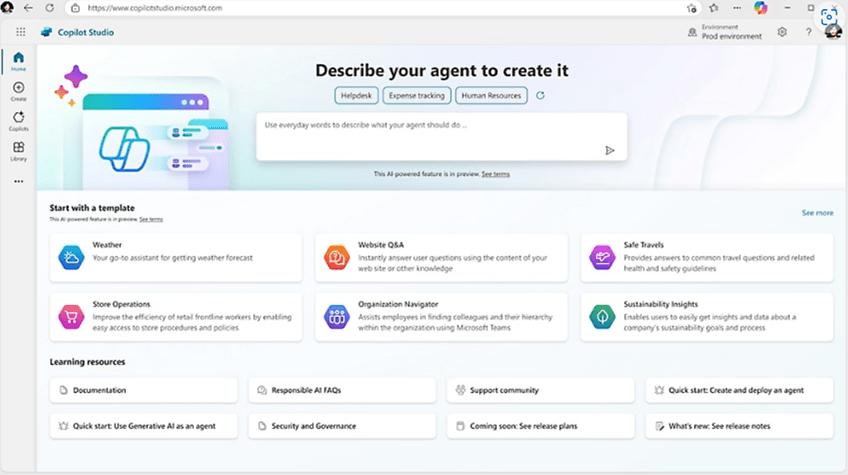
Microsoft Copilot Studio is a conversational artificial intelligence platform which allows create agentsThe agents are expert systems that work in an automated way for your company. Agents are expert systems that work in an automated way for your company.
The personalised agents are an advanced extension of the Microsoft Copilotsdesigned to go beyond generic tasks and adapt specifically to the demands of each organisation. These agents can perform complete tasks, from start to finish, without the need for human intervention. We talked about all of this in our article: Automate Your Business with Custom Agents for Microsoft 365
Microsoft Copilot Studio encompasses, among other applications, what used to be Microsoft Virtual Agents, with all these innovations:
- Copilot AgentsThey allow the creation of customised co-pilots that can act as automated assistants in business processes.
- Copilot extensionsIt is now possible to customise Copilot's capabilities and publish them to Microsoft 365 and Teams.
Microsoft has significantly improved Power Virtual Agentsits enterprise chatbots platform:
- Copilot in Power Virtual AgentsGenerative AI allows bots to better understand users' questions and provide more accurate answers without the need for complex programming.
- New Creation InterfaceThe bot creation experience has been redesigned, making it more intuitive and accessible to non-technical users.
- Integration with Teams and Microsoft 365Bots can now work more seamlessly within Microsoft Teams, improving internal communication within companies.
- Enhanced connectivity with Power AutomateBots can trigger more complex automated flows, enabling more dynamic interactions with users.
Conclusion
The latest updates on Microsoft Power Platform will enable users to improve advanced data analytics, optimise workflows, enhance security and leverage AI to create business solutions, without requiring extensive technical expertise.
For this reason Microsoft Power Platform was appointed leader in the Gartner® Magic Quadrant™ 2024 for low-code enterprise application platforms for the sixth consecutive year. This recognition reflects the confidence of millions of users who use Microsoft Power Platform for advanced data analysis, application development, process automation and the creation of co-pilots (intelligent virtual agents).
Microsoft Power Platform continues to innovate every day to remain the market leader. It has just presented on its website the wave of updates that will be released in April 2025, which we will talk about in depth in our next article:
Next-Step are Power Platform experts
Next-Step we are Microsoft Solutions Partner Gold and experts in project development with Microsoft Power Platform. Contact us, we want to help you:

*This article has been generated with artificial intelligence and information from the official Microsoft website.: Microsoft Power Platform