
Next-Step Consultores, we are co-founders and active participants in the community Power Platform Spain.
We invite you to watch the last workshop given by our Director, José Luis Cano Coello: "Sensors and Power BI"as part of the Power Platform Madrid.
It can be viewed in full at the following link:
Click here to see the Workshop: Sensors and Power BI
Monitoring IoT sensors with Power BI
The power monitor in real time sensors of IoT (Internet of Things) through Power BI and set up alerts and notifications has been a revolution for many sectors of activity.
From the primary sector, for example in the agricultural sector, where sensor data on crops is being monitored and analysed in order to make the best decisions to improve agricultural production.
It has also brought about a revolution in the industrial sector by improving industrial processes through the management and analysis of data from interconnected devices through Internet of Things (IoT). But its application in the service sector, such as the tourism sector, for the control of buildings, infrastructures and transport, the health sector, for the control of hospitals and machines, the construction sector and smartcities, etc., is also a huge advantage.
Sensors and Power BI Workshop: What You Will Learn
In this workshop you will see a practical example of how to capture sensor data, send it in real time to Power BI, visualise it in graphs, set up alerts with Power Automate and communicate them through Outlook and Teams.
If you watch the video and do the practice, you will learn:
- How to capture sensor data (temperature, pressure, humidity, etc.) with a Blackberry Raspberry Pi and bring that data into the Azureusing IoT Hub and Stream Analytics.
- How to pass this streaming data to Microsoft Power BI and at the same time store it in a Azure SQL database.
- How to build a Power BI alarm that allows notifications to be sent to a Microsoft Teams and to Microsoft Outlookwhen the temperature rises above a certain threshold, thanks to the Microsoft Power Automate.
Elements of the Sensors and Power BI Demo:
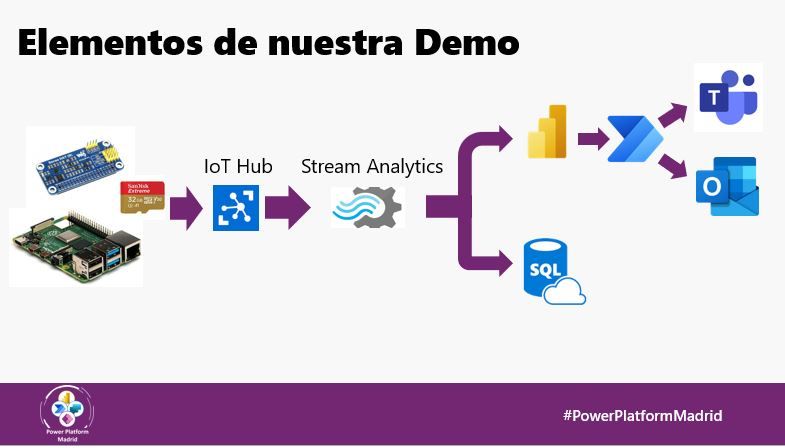
The practice basically consists in connecting a temperature and humidity sensor to a Blackberry Raspberry Pi, then pass this data in real time to Microsoft Power BI (through the functionality Streaming Data Set), display these data in Power BI and establish a system of alerts and flows with Microsoft Power Automate, to finally establish a system for communicating the alerts, through Microsoft Teams and Outlook. The example will be that of a spa owner, who needs the system to alert him when the temperature in the sauna drops below 37 degrees Celsius..
Therefore, if in addition to watching the workshop, you want to do this practice live, you will need the following elements:
- A Blackberry Raspberry Pi: More information: raspberrypi.org
- Sense Hut device, a board that plugs into the Blackberry to measure temperature, pressure and humidity.
- A free Microsoft Azure account, https://azure.microsoft.com/es-es/free/in order to be able to create the two necessary resources:
- Streaming Analytics Job: https://docs.microsoft.com/es-es/azure/stream-analytics/stream-analytics-introduction
- A Power BI Pro account
- Microsoft Power Automate account, https://flow.microsoft.com/es-es/
- Microsoft Teams account: https://www.microsoft.com/es-ww/microsoft-teams/log-in
- Have Microsot Outlook email available
Next-Step Consultores, we are an official Microsoft partner and Power BI/Power Platform project development experts
Next-Step Consultores, we are official Microsoft partner and experts in project development with Power BI and Power Platform. If you need help to implement this sensor monitoring, alerts and notifications system with Microsoft technology in your company, do not hesitate to contact us and we will be happy to help you:
https://next-step.es/contacto/
