Microsoft Fabric, the new unified data platform AI-based
Microsoft Fabric is Microsoft's new unified data platform, which was unveiled on 23 May at the event Build 2023 and is still in draft form.
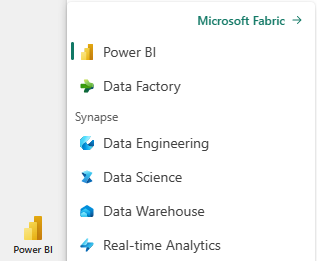
Microsoft Fabric is integration Power BI, Azure Synapse and Azure Data Factory on a single platform software as a service SAAS, which brings together the following tools:
- Power BI: Thethe world's leading Business Intelligence platform.
- Data engineeringWorld-class Spark platform that enables data engineers to perform large-scale data transformation and democratise data across the lakehouse. Microsoft Fabric Spark's integration with Data Factory allows you to schedule and orchestrate Spark notebooks and jobs.
- Data FactoryAzure Data Factory combines the simplicity of Power Query with the scale and power of Azure Data Factory. You can use more than 200 native connectors to connect to on-premises and cloud data sources.
- Data science: Allows to create, implement and run machine learning models, integrating with Azure Machine Learning.
- Data WarehouseProvides industry-leading SQL performance and scale. Completely separates processing from storage, enabling independent scaling of both components. In addition, it stores data natively in Delta Lake's open format.
- Real-time analysis Real-Time Analytics is the best-in-class engine for observational data analysis.
(Source text and images: https://www.microsoft.com/es-es/microsoft-fabric)
What is Microsoft Fabric?
Microsoft Fabric is a distributed development platform that is based on technologies such as Azure Service Fabric and other Microsoft Azure components. It provides an environment in which developers can build, deploy and manage scalable and highly available applications in cloud and on-premises environments.
This platform leverages the microservices architecture, which decomposes applications into small, independent components called microservices. These microservices communicate with each other and can be scaled and deployed independently, providing greater flexibility and efficiency in application development.
Key features of Microsoft Fabric:
- Scalability: Microsoft Fabric is designed to handle intensive, ever-growing workloads. It can automatically scale the resources needed to meet demand, allowing applications to run efficiently even in high-concurrency environments.
- Resilience and high availabilityMicrosoft Fabric ensures application availability by providing built-in failover mechanisms. If a microservice fails, the platform can automatically restart it or replace it with a new, healthy instance, minimising the impact on overall application performance.
- Simplified administrationThe platform provides tools and services to facilitate the administration and monitoring of applications. Developers can monitor the status of microservices, perform seamless updates and centrally manage configuration.
- Cross-platform supportMicrosoft Fabric supports a variety of programming languages and development frameworks, giving developers the flexibility to choose the tools they are most comfortable with. It also supports different operating systems, allowing applications to be deployed in a variety of environments.
Benefits of Microsoft Fabric:
- Greater agility in developmentMicrosoft Fabric's microservices architecture and auto-scaling capabilities allow developers to iterate quickly and respond agilely to changing business requirements.
- Increased reliability: With its focus on high availability and resilience, Microsoft Fabric ensures that applications remain available even in the event of hardware or software failures.
- Efficiency in the use of resources: The ability to scale resources only when needed helps optimise infrastructure usage and reduce operational costs.
(Source: GPT Chat)
How to enable Microsoft Fabric:
To enable Microsoft Fabric we need to have the Power BI Premium license.
We access with the Administrator of Power BI. It can be found in the new features of the Power BI:
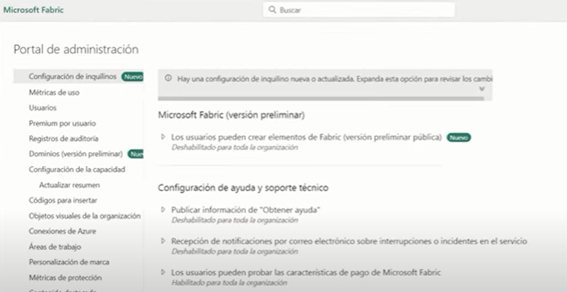
Select "Apply to: Entire organisation".
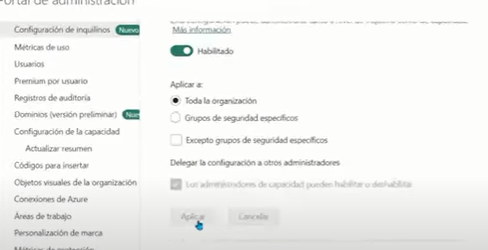
We then refresh the page and wait for the changes to be completed.
The entire Microsoft Fabric toolset is now displayed:
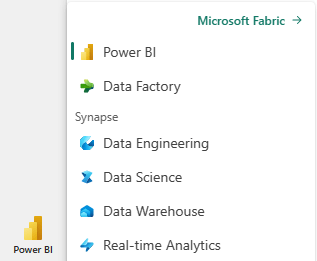
If you don't have a Power BI Premium licence, you can take a free trial of the tool from Microsoft's website:
Follow these steps to start the trial version of Fabric (preview version).
- Open the Fabric homepage and select the account manager.
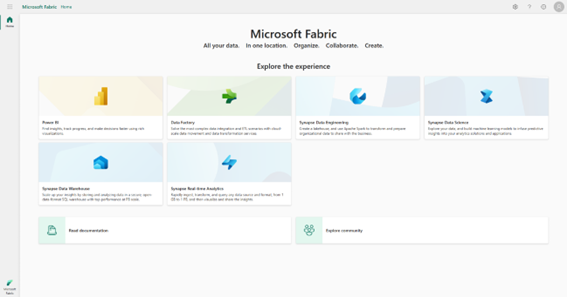
- In the Account Manager, select Start evaluation.
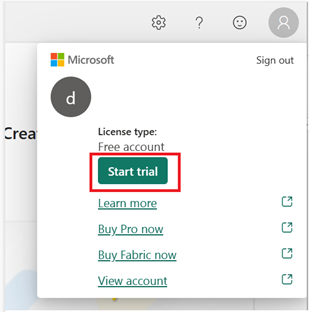
- If prompted, agree to the terms and select Start test.
- Once the test capability is ready, you will receive a confirmation message. Select Got it to begin working in Fabric.
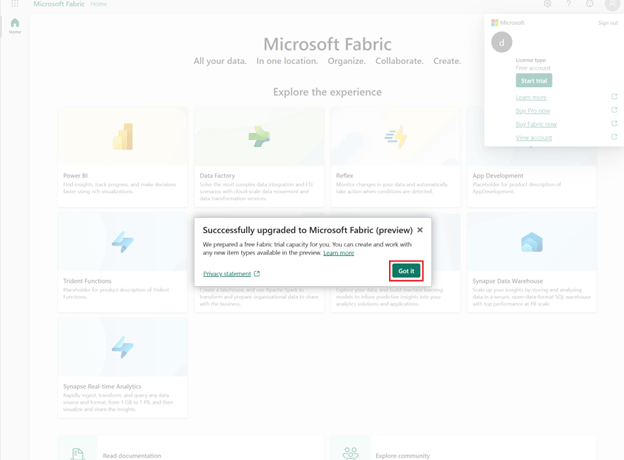
- Re-open the account manager. Note that you now have a header for Test status. The account manager keeps track of the number of days remaining in the trial. You will also see the countdown in the woven menu bar when working on a product experience.
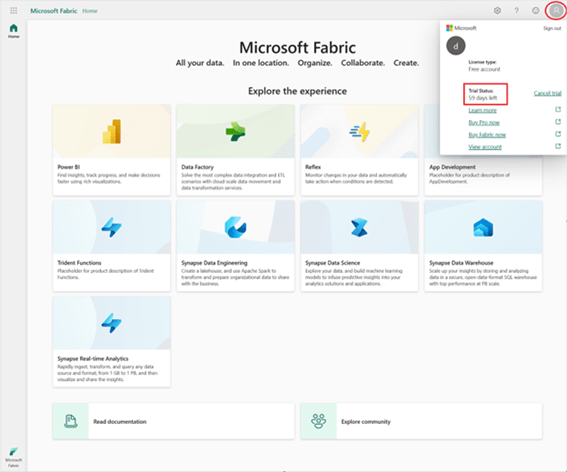
Congratulations! You now have a trial version of Fabric (preview version) which includes an individual trial version of Power BI (if you do not already have a license of payment and a test capability of Fabric (preliminary version).
(Source paragraph and images: Microsoft Fabric trial website: https://learn.microsoft.com/es-es/fabric/get-started/fabric-trial)
Next-Step can help you to successfully deploy Microsoft Fabric