Introduction: What is Microsoft Fabric?
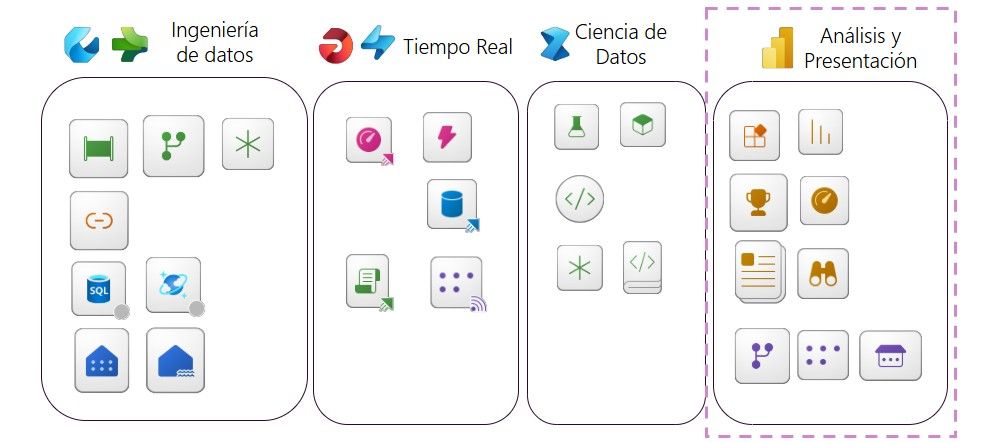
Microsoft Fabric is Microsoft's new bid to offer a unified data analysis platform that goes beyond what Power BI traditionally offers. While Power BI has been a benchmark in data visualisation and analysis for business users and analysts, Microsoft Fabric expands this spectrum to become a true meeting point for all data professionals: data engineers, data scientists, analysts and business users.
Fabric is not just an evolution of Power BIis a end-to-end platform that enables everything from data ingestion to data visualisation, all within a simplified, collaborative working environment. It provides integrated data warehousing, transformation, modelling, analysis and visualisation tools, all on a fully managed SaaS architecture.
OneLake: The single data lake for your organisation

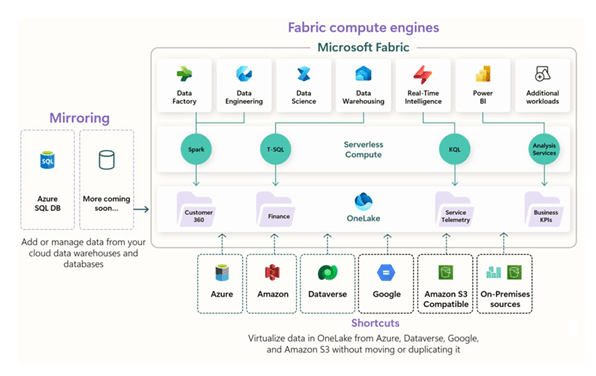
One of the pillars of Microsoft Fabric is OneLakea unified storage service for the entire organisation. Just as OneDrive offers personal cloud storage for each individual, OneLake acts as the "OneDrive of data" for the entire enterprise.This allows different profiles to work on the same data without the need to replicate or move it between systems.
OneLake radically simplifies working with data by providing a frictionless layer of virtualisation, governance and sharing, integrating naturally with the various analytics engines of Fabric. It also allows companies to take advantage of the best of cloud infrastructure (as if they were using Azure directly), but without the need to manage complex services or set up architectures from scratch.

Data mining engines: One platform, multiple approaches
One of the great advantages of Microsoft Fabric is that it provides multiple data analysis engines within a single platform, adapting to the needs of each team or project:
- LakehouseDataLabs: combines the best of data lakes and data warehouses. It is ideal for big data projects where flexibility and scalability are required.
- DatawarehouseSQL: a dedicated engine with optimised capabilities for relational warehousing and SQL-like analytical queries.
- KQL (Kusto Query Language)Perfect for analysis of semi-structured and event data, such as activity logs or telemetry data.
- Analysis ServicesIn-memory engine for highly optimised semantic models, the same engine that powers Power BI datasets.
These motors are not isolated, but are integrated on top of OneLake, This allows data to be available to all of them natively and without duplication.

What about costs? Comparison with Power BI
One of the key elements in considering the adoption of Fabric is to understand how the pricing model is structured. While Power BI Premium and Power BI Embedded charge for specific dedicated capacities for visualisation, Microsoft Fabric offers broader capabilities, including data transformation, warehousing, and data modelling..
The capacities of Microsoft Fabric are hired as Fabric capabilitiesmeasured in units called F SKUs (F2, F4, F8, F16, etc.), which allow resources to be distributed among all the platform's services, not just for visualisation as was the case with Power BI Premium.
A simplified comparison table is shown below:
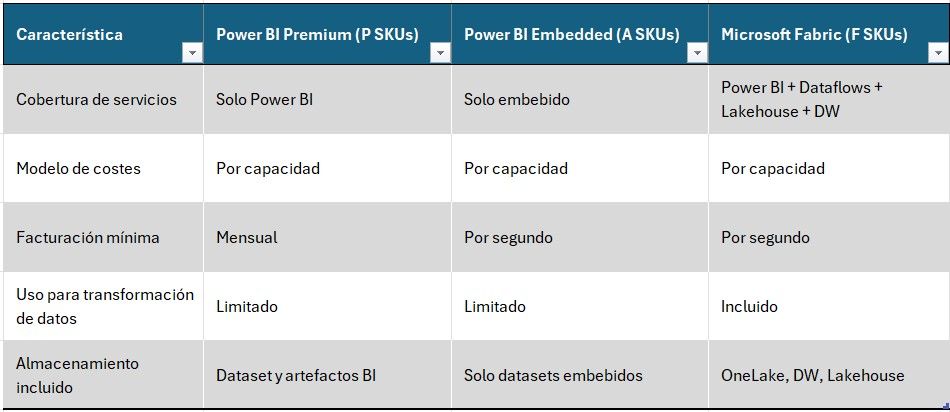
Conclusion: although the costs of Microsoft Fabric may appear similar to those of Power BI Premium, performance is significantly higherThe new software, allowing companies to consolidate multiple tools and workflows on a single platform.

Examples of Microsoft Fabric adoption
Below, we present case studies of Microsoft Fabric adoption projectsThe focus was on companies that were already Power BI users:
1. Orchestration of Dataflows through Pipelines
A company in the retail sector implemented Fabric pipelines to automate the sequential execution of multiple dataflows (data extraction and transformation), including validation steps and e-mail communication in case of errors or process termination. Thanks to FabricThe need for external solutions such as Azure Data Factory or Power Automate was eliminated, centralising everything in a single interface.
2. Using Dataflows Gen2 to feed a Datawarehouse
Another data-intensive organisation used Second generation dataflows to load and transform their data directly into a Fabric Datawarehouse. The big advantage was that the data was available to multiple tools (Power BI, notebooks, SQL) without replication, and all with traceability and governance centralised in Fabric.
3. Real-time data capture from IoT sensors
A company in the industrial sector has implemented a solution for real-time data capture from IoT sensors using Microsoft Fabric. The sensors, connected through the Azure IoT Hub, continuously sent data that was ingested by Eventstream in Fabric. This data was stored in a KQL Database for real-time analysis and visualisation via interactive dashboards. In addition, automatic alerts were configured with Data Activator to notify the operations team of any anomalies detected in the sensor data. This solution enabled proactive monitoring and rapid response to critical events, significantly improving operational efficiency.
Conclusion
The adoption of Microsoft Fabric represents a paradigm shift for those companies that already rely on Power BI. By expanding analytical, governance and collaboration capabilities, Fabric offers a unified solution that can cover the entire data lifecycle, from ingest to visualisation. If you are using Power BI but are encountering limitations to orchestrate processes, transform data on a large scale or integrate different data profiles on a single platform, it's time to make the leap to Microsoft Fabric.
If you want to successfully migrate to Fabric: