

Teleworking: From necessity to opportunity
Since the early 2020s, with the onset of the COVID19 pandemic and containment, many organisations have been forced to implement models of teleworking tools for positions that did not require physical presence. At the beginning, many companies and organisations allowed their workers to connect remotely to the physical office equipment from home, or to set up a remote desktop infrastructure, but within their Datacenter (physical servers). This generated many problems: complex implementation, due to the need to deploy and maintain VPN networks, saturation of the corporate network, serious security problems, etc. But it was an emergency solution, to solve a specific and apparently temporary problem. However, teleworking has gone from being a necessity to a great opportunity for companiesThe benefits in terms of work-life balance, increased productivity and significant cost savings. For this reason, teleworking is now firmly established in many companies. So now these companies need to have an effective solution for remote working that allows their employees to connect and access information and applications, at any time, from any device, anywhere, easily, quickly and securely.
To this end, today we are going to talk about Azure Virtual DesktopThe best solution for deploying remote desktops.
What is Azure Virtual Desktop

Azure Virtual Desktopformerly known as Windows Virtual Desktopis a system based on Microsoft Azure, Microsoft's cloud to virtualise its Windows operating systems, providing businesses with secure, virtualised remote desktops and applications in the cloud.
Azure Virtual Desktop allows you to work collaboratively and remotely, accessing from virtually any location and device, securely and efficiently.
Azure Virtual Desktop is a service platform, i.e., it is a PAS (Platform As a Service).
With Azure Virtual Desktop we can access Windows Server, Windows 10 & Windows 10 Enterprise + Microsoft Office 365. We can also incorporate many other Microsoft applications:
- Microsoft Teams
- Microsoft OneDrive
- Microsoft Outlook
And we can interact with all the services of Microsoft Azure, which comprises more than 200 cloud products and services, as well as numerous industry solutions.
Benefits of Azure Virtual Desktop
Azure offers significant advantages over other desktop virtualisation or remote working solutions:
- Increased Cloud SecurityCompliant with all global Cloud security standards.
- End-to-end security for virtual desktops
- Maximum infrastructure and data security
- Multi-device access from any operating system: Azure Virtual Desktop allows users to connect to the virtual desktop from any device (PC, MAC, tablet, smartphone...) and operating system: iOS, Android, Windows, MacOS, etc.
- Simplicity in managementThe previous Virtual Desktop solutions the company's IT team had to take care of everything (Licenses, Maintenance, Storage, Hosting...), but with Azure we only take care of the configurations and image management, the rest is taken care of by Microsoft Azure.
- Migration: You can easily and securely migrate different Windows servers.
- Scalability: It can be deployed and scaled in minutes, with unified management in Azure Portal.
- Global: Azure has deployed its virtual servers almost everywhere in the world, in more than 140 countries.
- Application virtualisation. Thanks to this technology we can bring to the cloud corporate applications (such as custom applications, Navision, SAGE, A3, JDEdwards) that will be consumed from the user's computer with excellent performance and with a simple and efficient administration.
Pre-requisites and Licenses needed to install Azure Virtual Desktop:
- The first requirement is to have a Microsoft Azure subscription.
- At the client level, in order to use office automation you need to have some of the Microsoft 365 licences.
- At server level, CAL licences. Users must have configured RDS access to be able to interact with this solution.
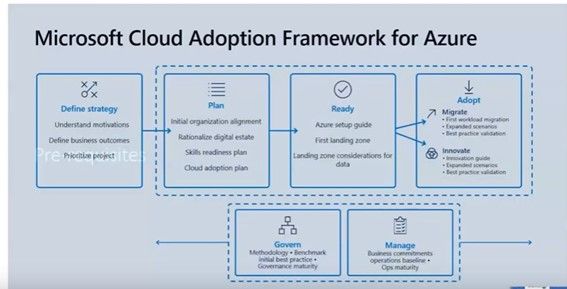
Microsoft has a framework for best practice in Cloud adoption.
Next-Step Microsoft Partner Consultants & Azure Experts
Next-Step Consultants are Microsoft Certified Partner and experts with extensive experience in developing projects with Azure and other Microsoft technologies. We can help you to successfully deploy Azure Virtual Desktopdefining the most appropriate strategy, depending on the characteristics and needs of your company.
Another key to success lies in data governance and management. Next-Step Consultants are experts in Data Management and Business Intelligence.
Contact us atTell us about your project and we will advise you without obligation:
I am interested in learning more about Azure Virtual Desktop